Run Gemma 4 E4B-it locally.
Every number measured, none invented.

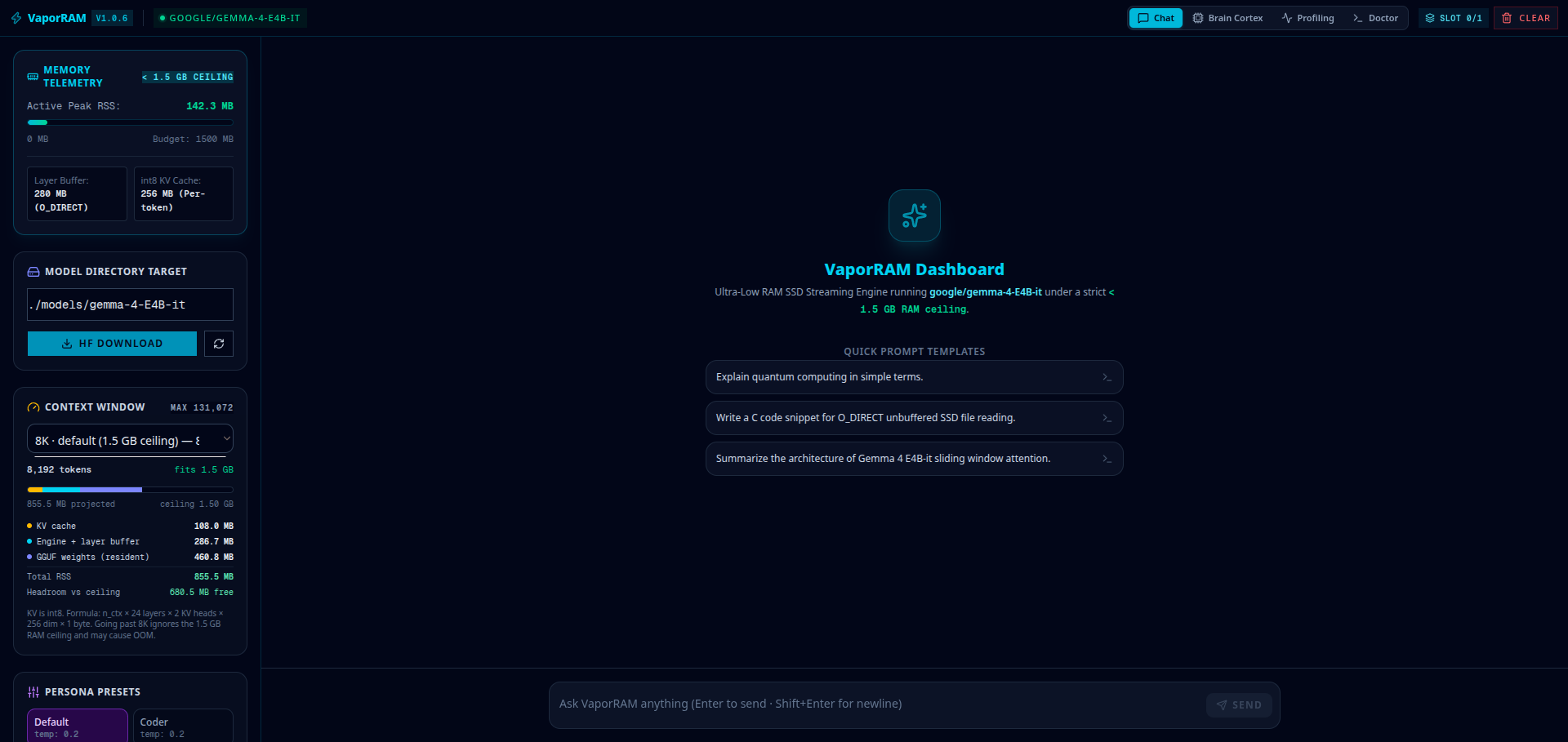
VaporRAM is a local inference server, terminal client and dashboard for google/gemma-4-E4B-it — an OpenAI-compatible API, reasoning you can actually read, and network sharing behind an API key. Token generation runs on llama.cpp. The dashboard reports what it measures on your machine and nothing else.
pip install vapor-ram v1.0.7 Release Downloads
VaporRAM Dashboard Interface Preview
Measured peak RSS
7.27 GB
Measured throughput
4.0–5.3 tok/s
O_DIRECT streaming
974.7 MB/s
RAM ceiling target
1.5 GB — not met

Measured on an AMD Ryzen 7 5700U (8 cores / 16 threads, 15 GB RAM, NVMe SSD) with gemma-4-E4B-it-Q4_K_M.gguf at n_ctx 8192. Reproduce them on your own hardware with vapor bench — none of these figures are estimates, and the 1.5 GB ceiling is a research goal the project has costed, not a feature that is nearly done. See the full breakdown.

Core Architecture

Empirical optimization for low-spec laptops and serverless deployments.

Measured Layer Streaming

The C reader resolves each of the model's 42 transformer blocks to its real byte range in the GGUF and streams it with unbuffered O_DIRECT reads and posix_fadvise hints, reporting per-block timings. This is a measurement path — it costs out the streaming design on your own SSD. It does not generate tokens.

Reasoning You Can Read

gemma-4-E4B-it reasons natively, and VaporRAM shows the thought process as it streams — in a block you can expand and actually read, with four effort levels from Low to Extra high. Reasoning rides its own API channel, so clients that do not know about it render the answer alone.

Honest Telemetry

The dashboard reports the server's real RSS, the host's free RAM, the GGUF's actual tensor layout and the throughput of your last generation. Nothing is mocked or hard-coded — if a figure cannot be measured, it is not shown.

Quickstart Guide

Install from PyPI and run. Weights are downloaded separately.

1. Install from PyPI

pip install vapor-ram

2. Launch Web Dashboard

vapor web
# Starts local server and opens browser interface at http://localhost:8000/

3. Host LAN Gateway Server

vapor serve --host 0.0.0.0 --port 8000
# Exposes OpenAI-compatible endpoints (/v1/chat/completions, /v1/responses) across LAN